지난 글에서 이 앱이 왜 생겼는지 이야기했습니다. 이번에는 화면을 하나씩 열어 보면서, 각 화면이 가게의 어떤 장면을 대신하고 있는지 소개합니다.
Mazzucchi는 하나의 Flutter 코드베이스에서 앱 두 개로 빌드됩니다. 손님이 쓰는 Macelleria Mazzucchi, 사장님이 쓰는 Mazzucchi Admin입니다.
손님의 앱
메뉴판 — 전화 대신 목록
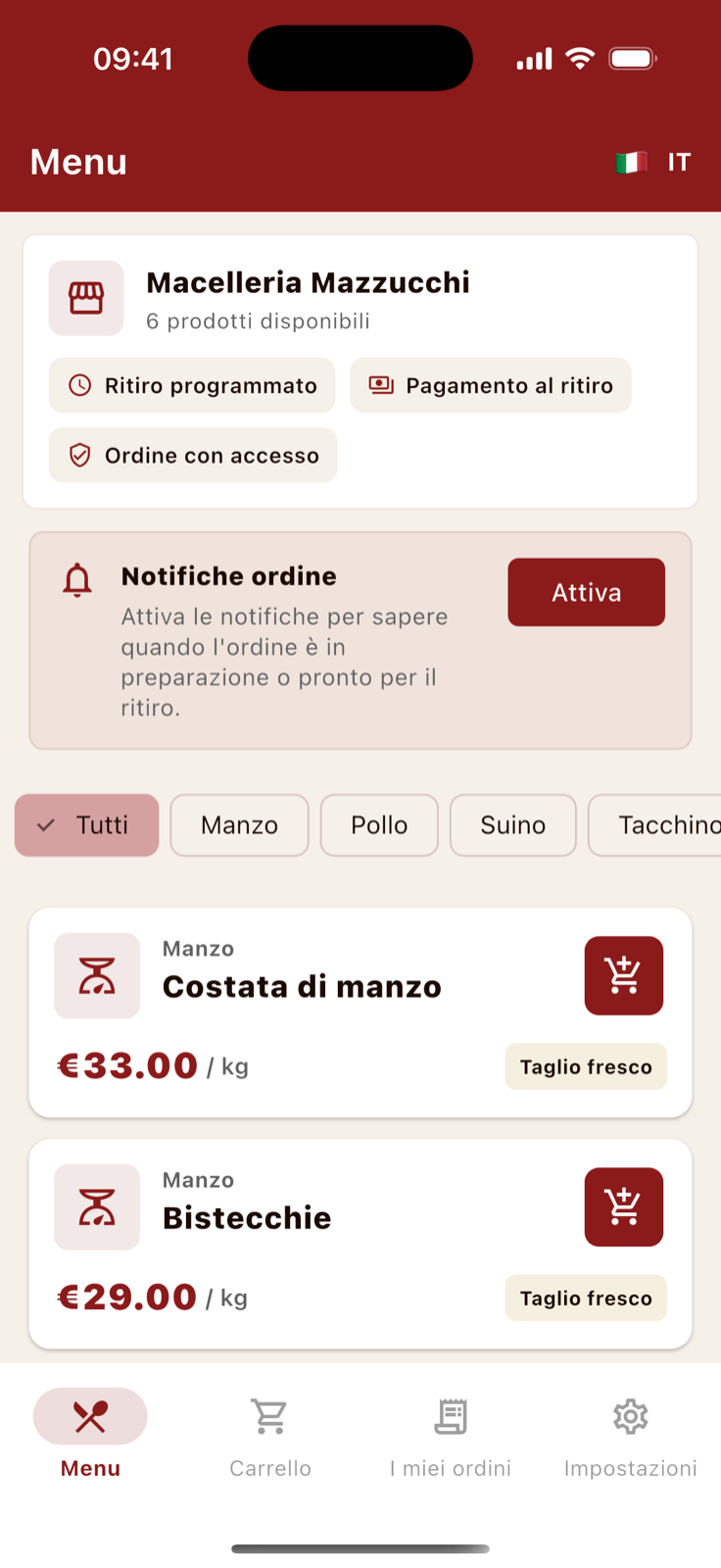
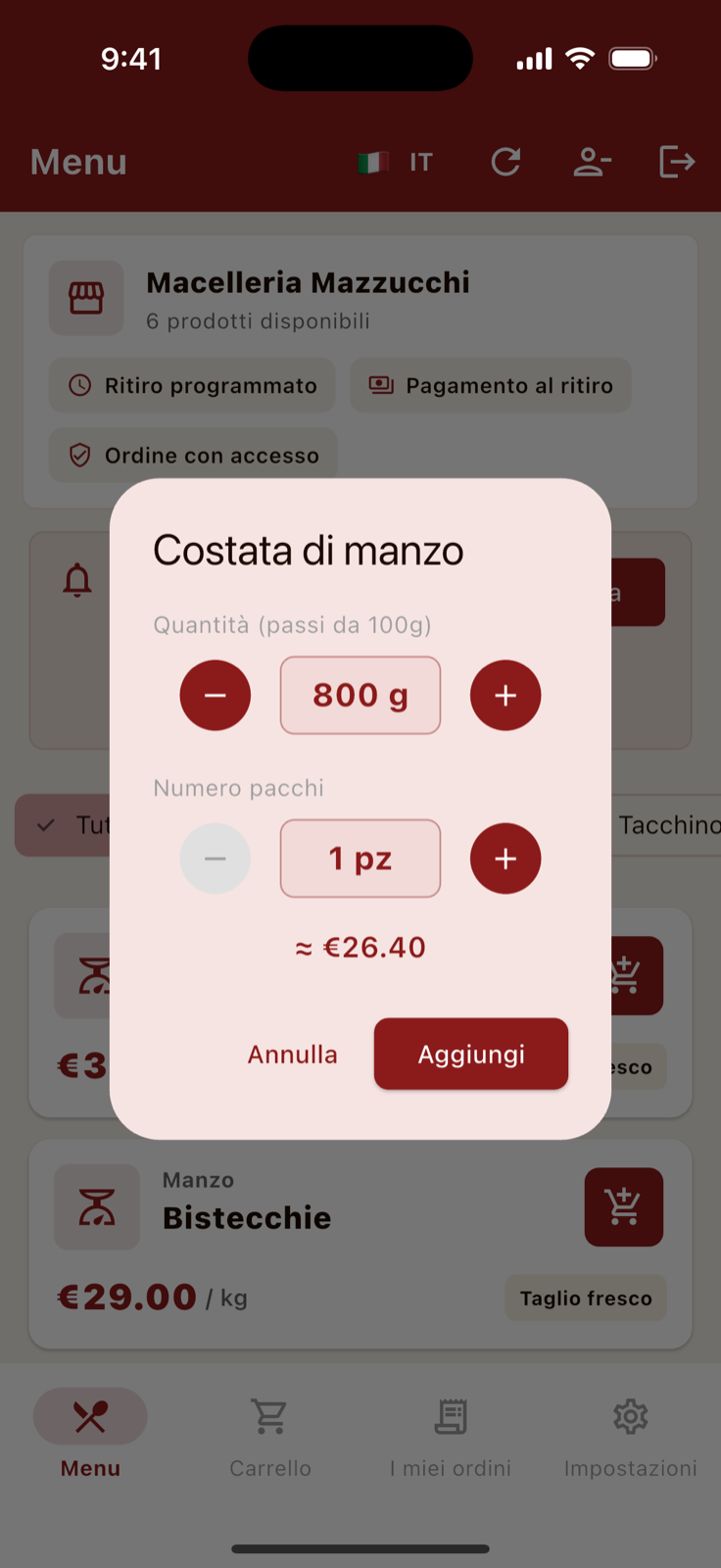
전화기 너머로 "저기… 구이용으로 좋은 부위 있나요?" 하던 대화가 카테고리 필터와 상품 설명으로 들어왔습니다. 정육점답게 수량은 100g 단위로 고르고, "두 팩으로 나눠주세요" 같은 부탁은 팩 수 입력으로 끝납니다. 담기 전에 예상 금액이 실시간으로 계산됩니다.
픽업 예약 — 가게의 시간표를 그대로
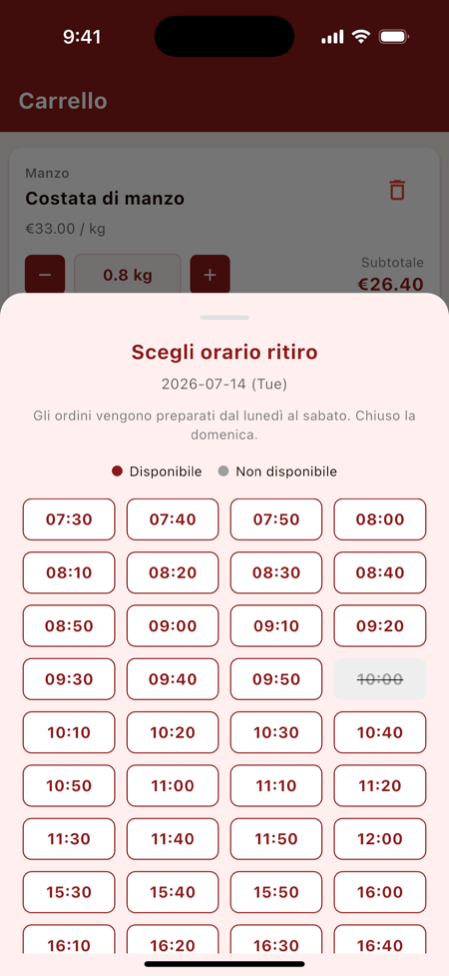
이 앱에서 제일 공들인 화면입니다. 슬롯은 10분 단위로 열리고, 가게의 실제 시간표가 그대로 반영됩니다. 점심 휴식(12:00→15:30)에는 슬롯이 아예 없고, 일요일은 달력에서 눌리지도 않습니다. 슬롯마다 정해진 주문 수가 차면 알아서 잠기고, 사장님이 "오늘 오후는 도저히 안 되겠다" 싶으면 손으로 잠글 수도 있습니다.
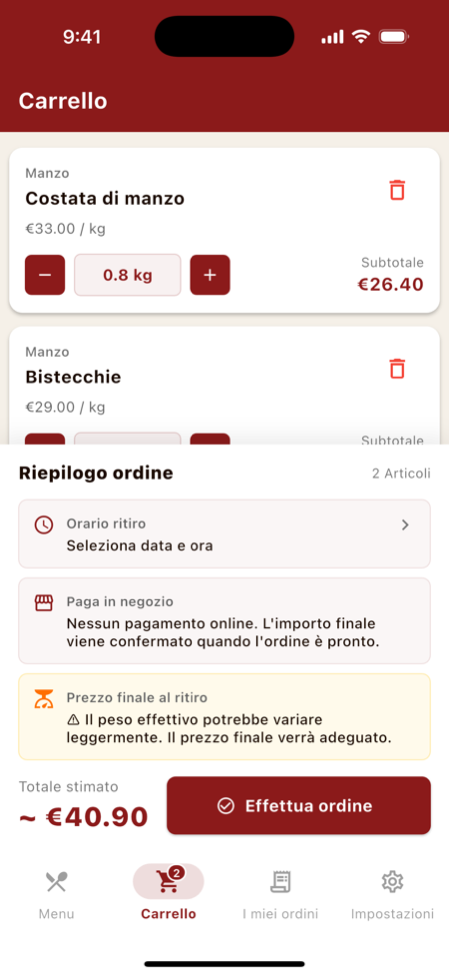
결제는 온라인이 아니라 픽업할 때 가게에서 합니다. 고기는 저울에 올라가 봐야 최종 금액이 나오니까요. 장바구니 화면이 이걸 미리 알려줍니다.
내 주문 — "제 거 됐나요?" 전화가 사라진 자리
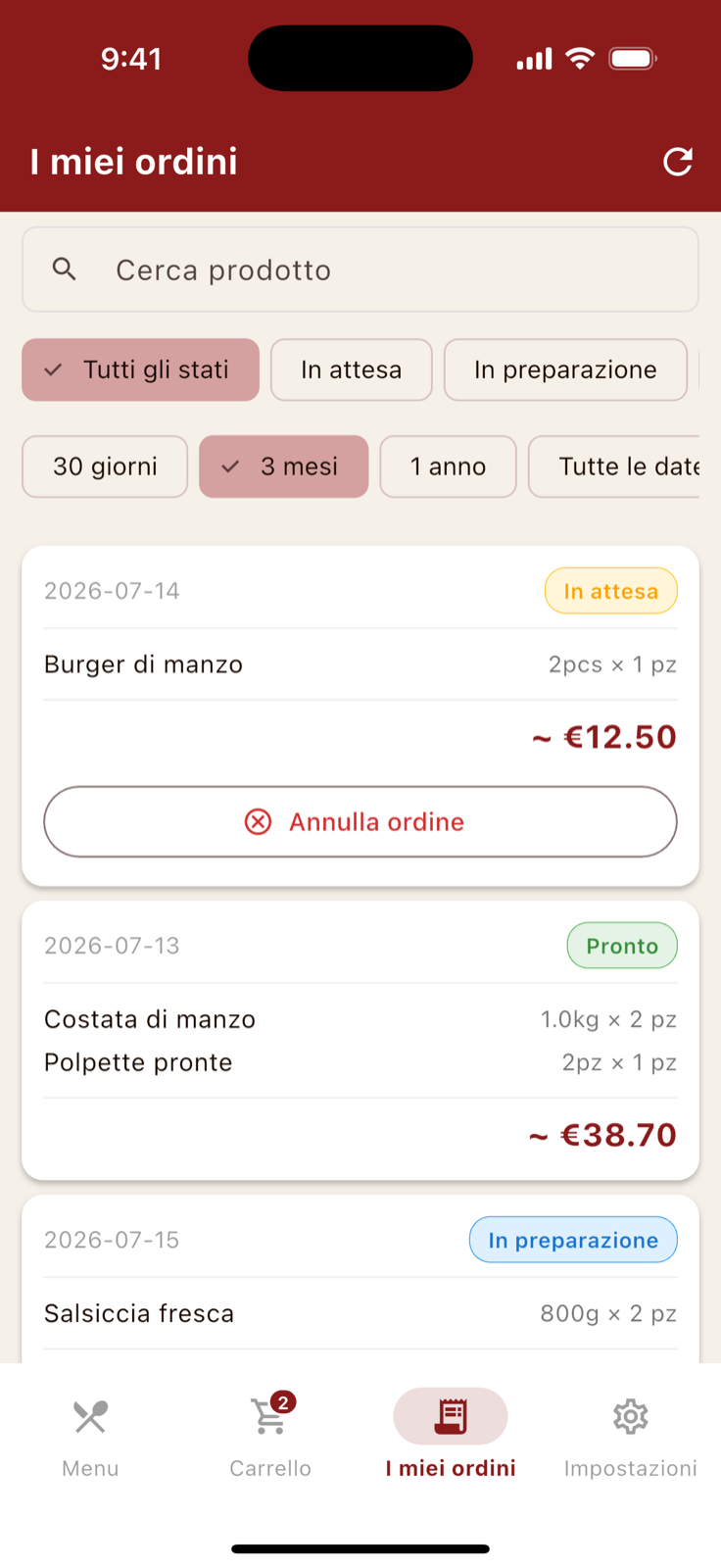
주문이 접수될 때, 준비가 시작될 때, 픽업 준비가 끝났을 때. 단계마다 푸시 알림이 갑니다. 주문 내역에서는 상태와 기간으로 거르고 상품명으로 검색할 수 있습니다. 사정이 생기면 픽업 2시간 전까지 앱에서 바로 취소하면 됩니다.
사장님의 앱
오늘의 주문 — 메모장이 하던 일
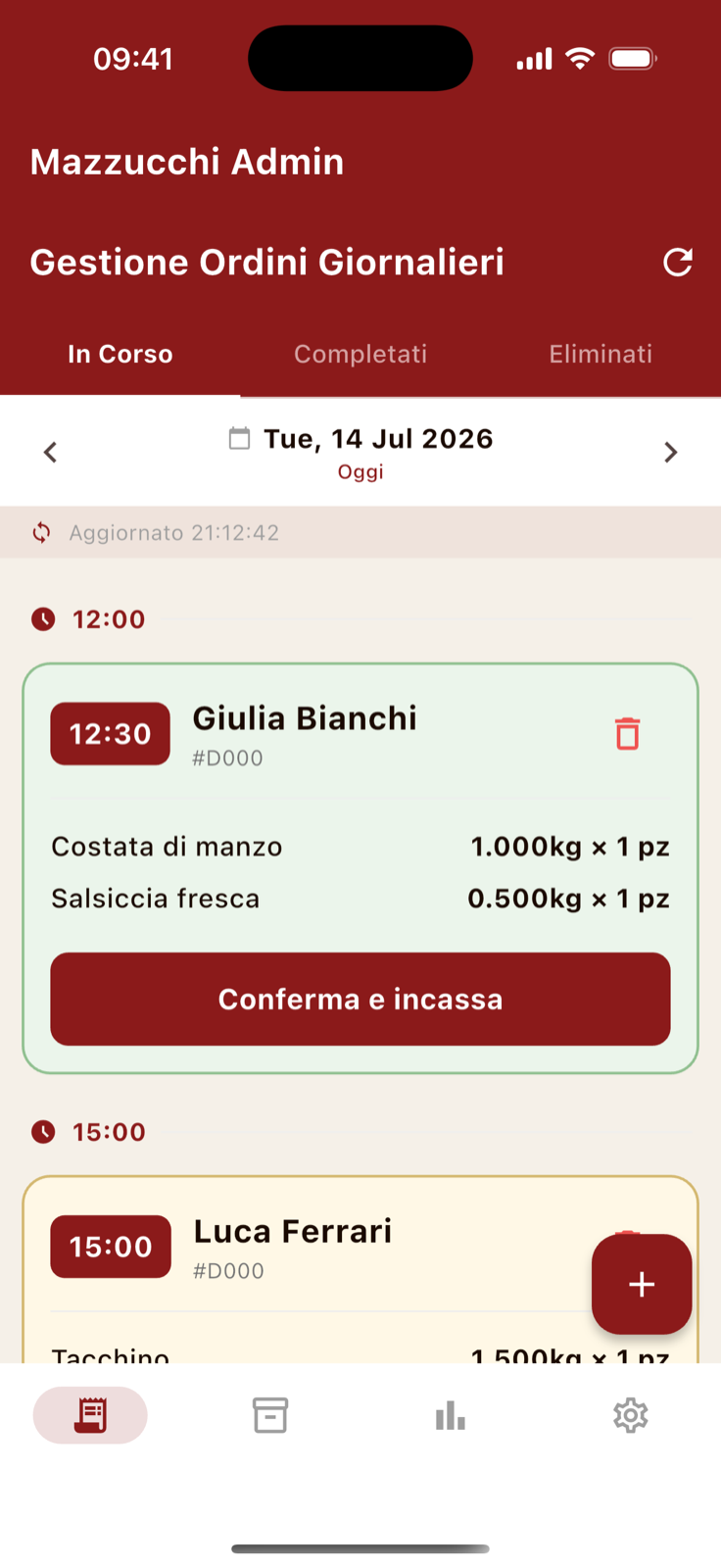
계산대 옆 메모장이 하던 일을 이 화면이 넘겨받았습니다. 주문은 픽업 시간순으로 줄을 서고, 카드 색만 봐도 상태가 구분됩니다. 준비가 끝난 주문에서 "Conferma e incassa"(확정하고 계산) 버튼을 누르면 실제 중량을 입력하는 화면이 열리고, 최종 금액이 확정되면서 손님에게 완료 알림이 갑니다.
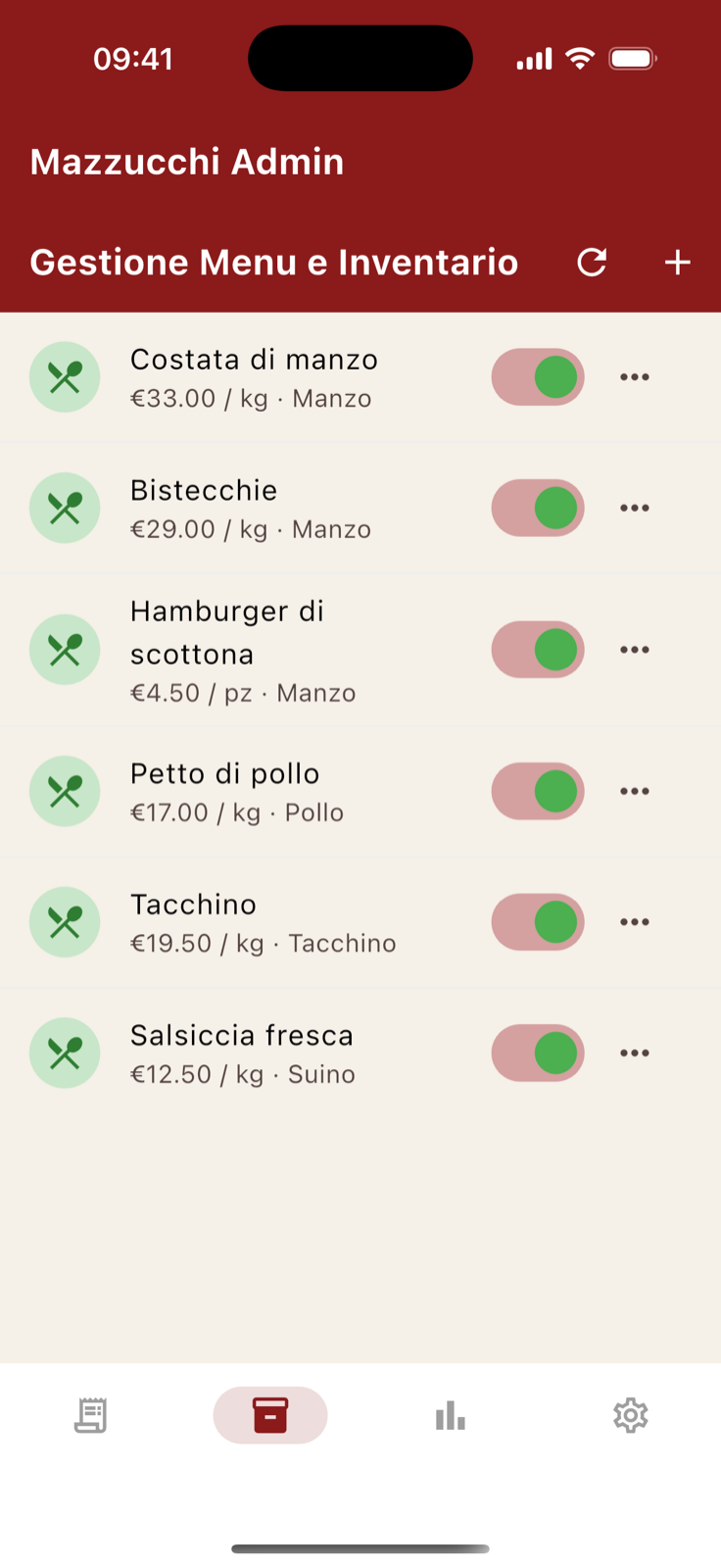
재고 화면은 정육점의 아침을 위한 기능입니다. 오늘 들어온 물량이 없는 부위는 토글을 내려두면 손님 메뉴판에서 주문이 막힙니다.
매출 — 영수증 뭉치 대신 그래프
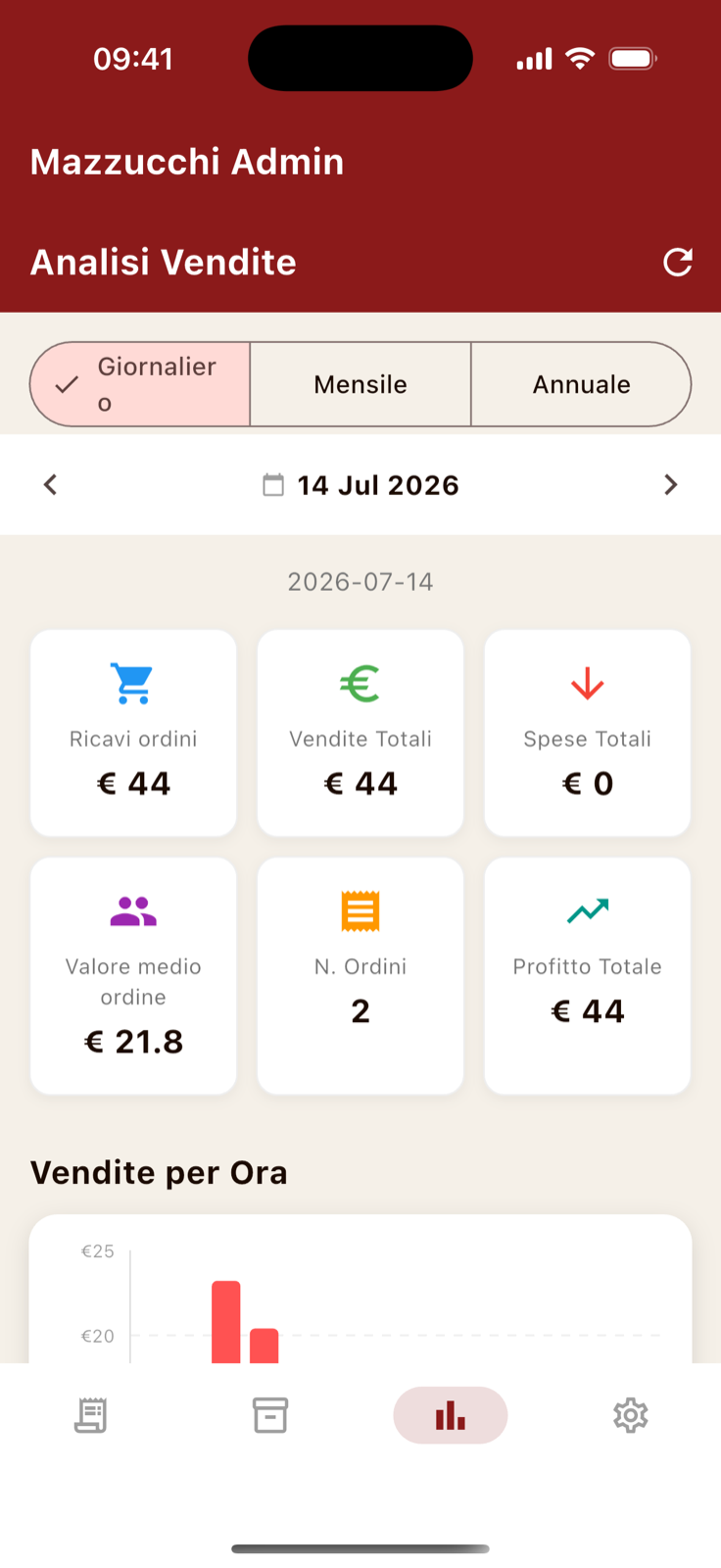
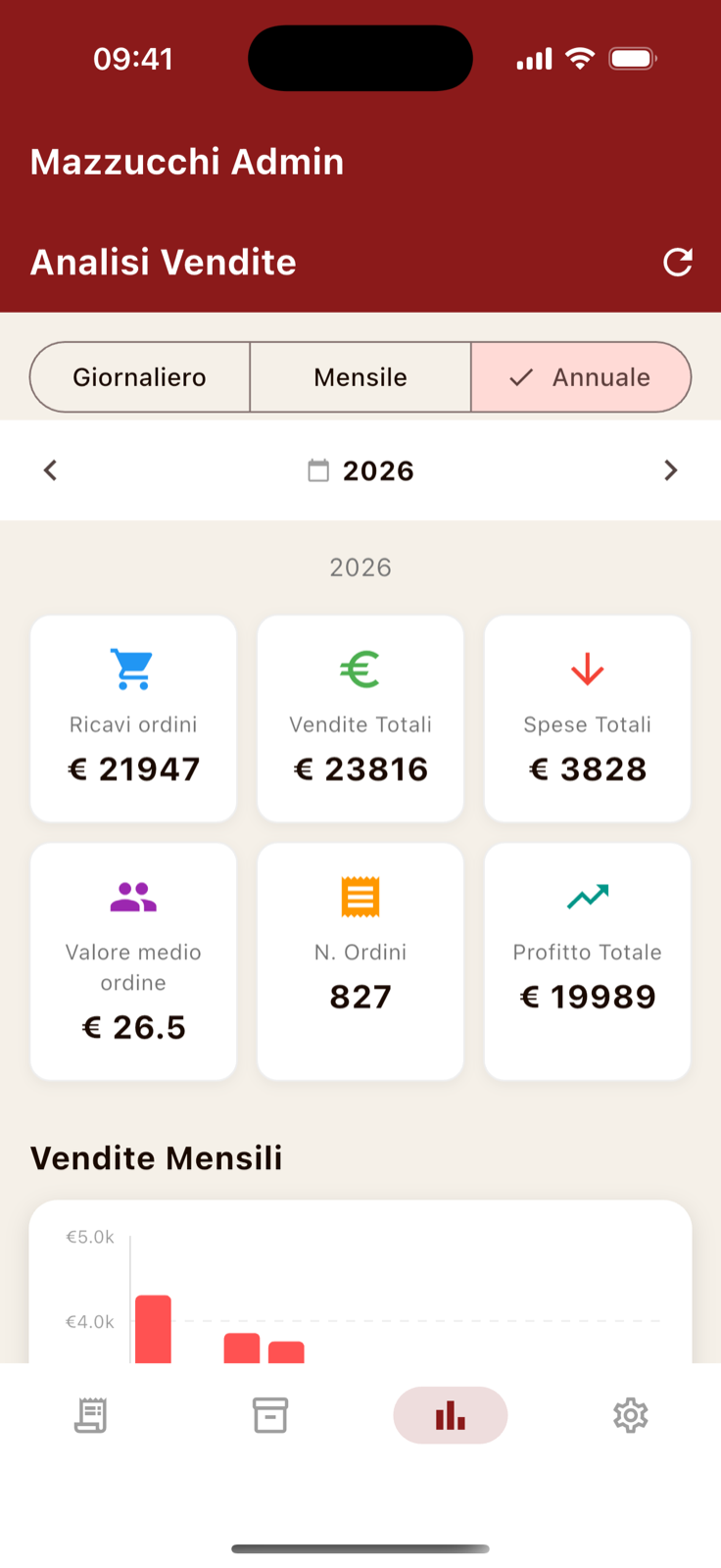
"이번 달 어땠지?"에 답하려고 영수증을 넘기던 시간이 사라졌습니다. 앱 주문만 잡히는 게 아니라 카운터에서 판 것과 지출도 직접 등록할 수 있어서, 가게 전체 숫자가 한 화면에 모입니다. 일·월·연으로 바꿔 보면 여름과 크리스마스 성수기가 그래프 위에 산처럼 솟아 있습니다.
운영 설정 — 가게의 리듬을 입력하는 곳
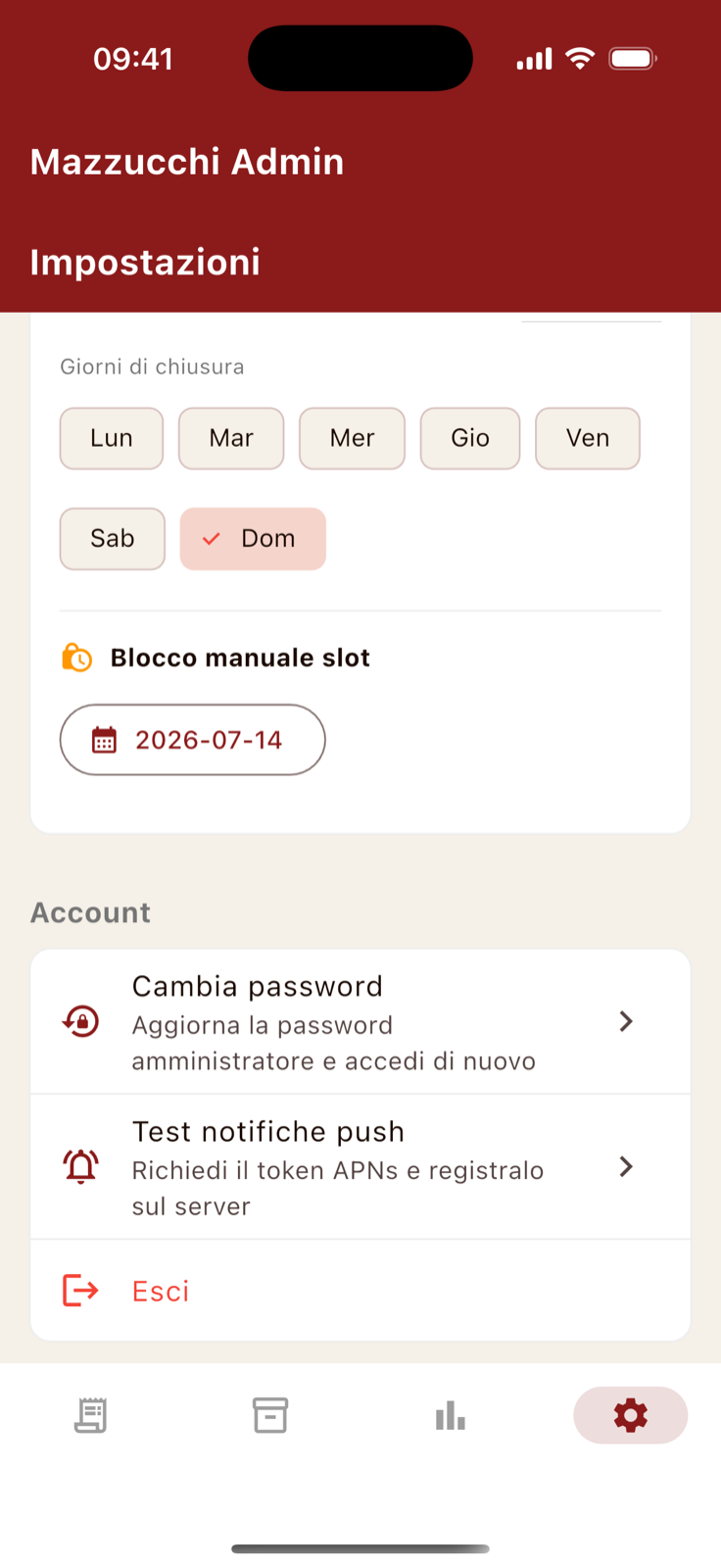
손님 앱의 슬롯 화면이 무대라면, 여기는 그 무대의 조명 스위치입니다. 슬롯당 최대 주문 수를 슬라이더로 정하고, 영업시간과 점심 휴식을 등록하고, 휴무일을 고릅니다. 여기서 바꾼 값은 곧바로 손님의 예약 화면에 반영됩니다.
눈에 안 보이는 기능 — 알림
푸시 알림은 두 갈래로 갑니다. iOS 기기로는 백엔드가 JWT를 직접 서명해서 APNs로 바로 쏘고, Android 기기로는 FCM을 거칩니다. 손님이 주문하면 사장님 휴대폰이 울리고, 사장님이 상태를 바꾸면 손님 휴대폰이 울립니다. 어느 쪽 폰이든요.
전화벨의 빈자리를 채우는 게 결국 이 알림입니다. 새 주문 알림 덕분에 사장님은 칼을 내려놓고 전화를 받으러 갈 일이 없고, 준비완료 알림 덕분에 손님은 "됐나요?" 전화를 걸 일이 없습니다.
기술 스택과 아키텍처, 배포 이야기는 개발기에서 이어집니다.
In the previous post, I told the story of why this app exists. This time, let's open the screens one by one and see which scene from the shop each screen came to replace.
Mazzucchi builds two apps from a single Flutter codebase: Macelleria Mazzucchi for customers, and Mazzucchi Admin for the owner.
The Customer's App
The Menu — a list instead of a phone call
The phone conversation that used to start with "so… what's good for grilling?" now lives in category filters and product descriptions. True to a butcher shop, quantity is chosen in 100g steps, and "could you split that into two packs?" becomes a pack-count field. The estimated price updates live before you add to cart.
Pickup Booking — the shop's timetable, verbatim
This screen is the heart of the app. Slots open in 10-minute steps and mirror the shop's real timetable: no slots during the lunch break (12:00→15:30), Sundays can't be selected on the calendar, and a slot locks itself once its order capacity fills. If the owner senses a hectic afternoon coming, any slot can be locked manually.
Payment happens at the shop, at pickup — not online. Meat gets its final price only after weighing, and the cart explains this up front.
My Orders — where the "is mine ready?" call used to be
When an order is received, when preparation starts, when it's ready for pickup — each step sends a push notification. The history screen filters by status and date range and searches by product name. If plans change, orders can be cancelled in-app up to two hours before pickup.
The Owner's App
Today's Orders — the screen that replaced the notepad
This screen does what the notepad by the register used to do. Orders sort by pickup time, and card colors show status at a glance. Tapping "Conferma e incassa" (confirm & collect) on a ready order opens the weight-entry screen; once the actual weight is in, the final price is fixed and the customer gets their "completed" notification.
The inventory screen exists for the butcher's morning: if a cut didn't come in today, one toggle takes it off the customer menu.
Sales — charts instead of a receipt pile
The hours spent flipping receipts to answer "how was this month?" are gone. Beyond app orders, counter sales and expenses can be logged manually, so the whole shop's numbers meet on one screen. Switch between day, month, and year, and the summer and Christmas peaks draw themselves onto the chart.
Operations Settings — where the shop teaches the app its rhythm
If the customer's slot picker is the heart, this screen sets its pulse. A slider caps orders per slot; opening hours and the lunch break are registered here; closing days are picked per weekday. Every change lands directly on the customer's booking screen.
The Invisible Feature — Notifications
Push notifications travel a dual path. For iOS devices, the backend signs a JWT and sends directly to APNs; Android devices go through FCM. A new order buzzes the owner's phone; a status change buzzes the customer's — both directions, on either platform.
In the end, it's these notifications that replaced the phone bell. The owner no longer stops mid-cut to grab a call, and customers no longer dial in to ask, "is mine ready?"
The tech stack, architecture, and deployment story continue in the dev log.