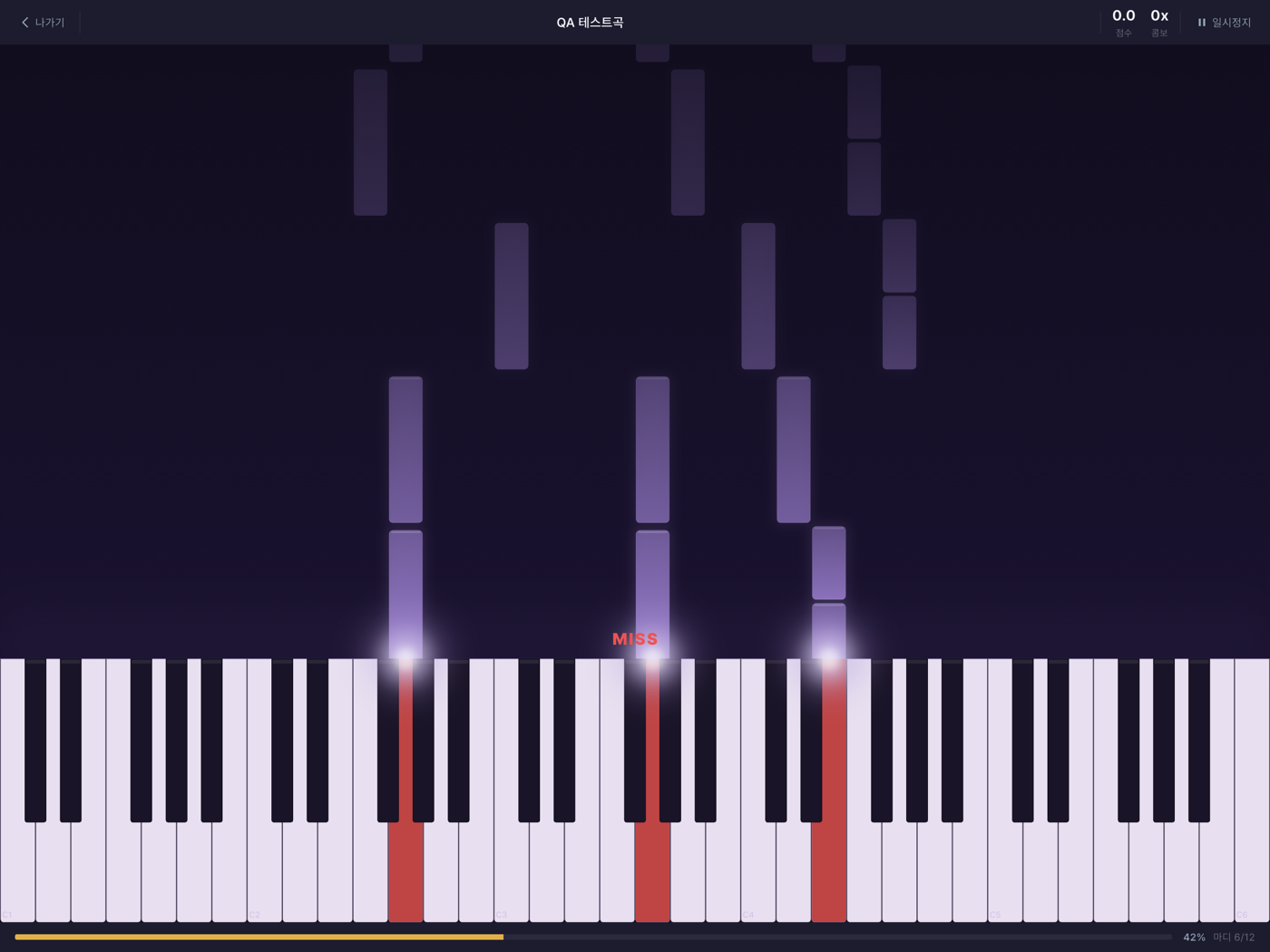
문제: "지금 이 건반이 맞나?"
리듬 게임처럼, LevelUp Piano도 화면에 노트가 흐르고 사용자가 건반을 눌러 맞춥니다. 하지만 피아노는 버튼 몇 개가 아니라 88건반의 화음입니다. 게다가 사람은 완벽히 정박에 치지 않습니다. 조금 빠르거나 늦게 치죠. 그 미묘한 어긋남을 "맞음/틀림"이 아니라 **정도(Perfect·Good·Bad·Miss)**로 판정해야 합니다.
시간축과 네 가지 판정
판정의 기준은 경과 시간(elapsed time) 입니다. 곡이 시작된 뒤 흐른 밀리초를 축으로, 노트 차트의 각 음은 "몇 ms에 나와야 하는지"를, 사용자 입력은 "몇 ms에 눌렸는지"를 가집니다. 두 시각의 차이(오차)의 절댓값이 곧 등급입니다.
| 판정 | 타이밍 오차 |
|---|---|
| Perfect | ≤ 50ms |
| Good | ≤ 150ms |
| Bad | ≤ 300ms |
| Miss | > 300ms (또는 안 침) |
"이르다/늦다"는 별도의 등급이 아니라 오차의 부호로 화면에 표시됩니다. 즉 등급은 대칭이고, 방향은 참고용입니다. 이 윈도우 폭이 난이도 감각을 좌우합니다 — 너무 좁으면 좌절하고, 너무 넓으면 시시해집니다. 300ms는 "정확히 못 쳐도 박은 맞았다" 정도까지 관대하게 잡은 값입니다.
두 단계로 나눈 판정 — 어택과 지속
한 음의 점수는 누른 순간만으로 끝나지 않습니다. 길게 끌어야 하는 음을 툭 놓아버리면 정확히 눌렀어도 반쪽입니다. 그래서 판정을 두 단계로 나눴습니다.
- 어택(Attack) — NoteOn이 예정 시각에 얼마나 가까운가 (위의 Perfect/Good/Bad/Miss).
- 지속(Duration) — 실제 누른 길이가 악보 길이에 얼마나 맞는가. 짧은 음(≤200ms)은 어택만 보고 즉시 확정하고, 긴 음은 손을 뗄 때(NoteOff)까지 기다렸다가 채점합니다.
# 긴 음(>200ms)의 최종 점수
final = attack_score × 0.7 + duration_score × 0.3

# 지속 등급 — 실제 누른 길이 ÷ 악보 길이
0.8 – 1.2 → 1.0     0.5 – 1.5 → 0.7     0.3 – 2.0 → 0.3     그 밖 → 0.0
어택 등급은 코드로도 그대로입니다 — 오차의 절댓값을 세 윈도우와 비교할 뿐입니다.
JudgmentResult _classifyAttack(int absOffsetMs) {
  if (absOffsetMs <= perfectWindowMs) return JudgmentResult.perfect; // ≤ 50ms
  if (absOffsetMs <= goodWindowMs)    return JudgmentResult.good;    // ≤ 150ms
  if (absOffsetMs <= badWindowMs)     return JudgmentResult.bad;     // ≤ 300ms
  return JudgmentResult.miss;
}
곡 전체 점수를 100점으로 환산해 S(≥90)·A(≥80)·B(≥70) 등급을 매기고, 마디 연습은 정확도 80% 이상이면 통과로 칩니다.
입력 버퍼링 — 미리 친 음을 붙잡아두기
가장 까다로운 지점은 순서였습니다. 사용자가 노트가 "활성화"되기 직전에 살짝 먼저 눌렀다면? 그 입력을 그냥 버리면 정직하게 친 사람이 억울해집니다.
그래서 매칭에 실패한 건반 입력을 버퍼에 최대 300ms 담아둡니다. 매 프레임(tick)마다 노트를 활성 구간으로 승격시키고, 버퍼에 남은 입력을 다시 매칭해봅니다. 300ms가 지나도록 붙을 노트가 없으면 버퍼에서 버립니다(오래된 입력이 엉뚱한 노트에 붙는 것을 막기 위해). 즉 판정은 "노트가 입력을 기다리기도, 입력이 노트를 기다리기도" 하는 양방향입니다.
판정은 양방향이다 — 노트가 입력을 기다리기도, 입력이 노트를 기다리기도 한다. 그래서 아주 살짝 빠른 연주도 억울하지 않게 잡아낸다.
화음과 손 — 어느 노트에 붙일까
피아노는 여러 음을 동시에 칩니다. 같은 순간에 여러 건반이 눌리면, 각 입력을 어느 노트에 붙일지가 문제입니다. 규칙은 best-fit입니다 — 입력과 음높이가 같은 미매칭 활성 노트 중에서 예정 시각과 가장 가까운 하나에 붙이고, 그 노트를 즉시 "매칭됨"으로 잠급니다.
// 활성·미매칭·같은 음높이 노트 중 시간이 가장 가까운 것에 붙인다.
_PendingNote? best;
var bestOffset = badWindowMs + 1;
for (final p in _active) {
  if (p.matched || p.note.noteNumber != noteNumber) continue;
  final offset = (inputTimeMs - p.note.startTimeMs).round().abs();
  if (offset < bestOffset) { bestOffset = offset; best = p; }
}
if (best == null) return null;   // 아직 붙을 노트 없음 → 호출부가 버퍼에 담는다
best.matched = true;             // 잠금: 한 입력이 두 노트에 붙지 않는다
"매칭됨" 잠금 덕분에 같은 화음 안에서도 한 입력이 여러 노트에 중복으로 붙지 않습니다. 노트 차트는 각 음이 어느 손인지도 담고 있어(왼손·오른손), 한 손만 연습하거나 손별로 약점을 진단하는 기능의 토대가 됩니다.
연결이 끊겨도 무너지지 않게
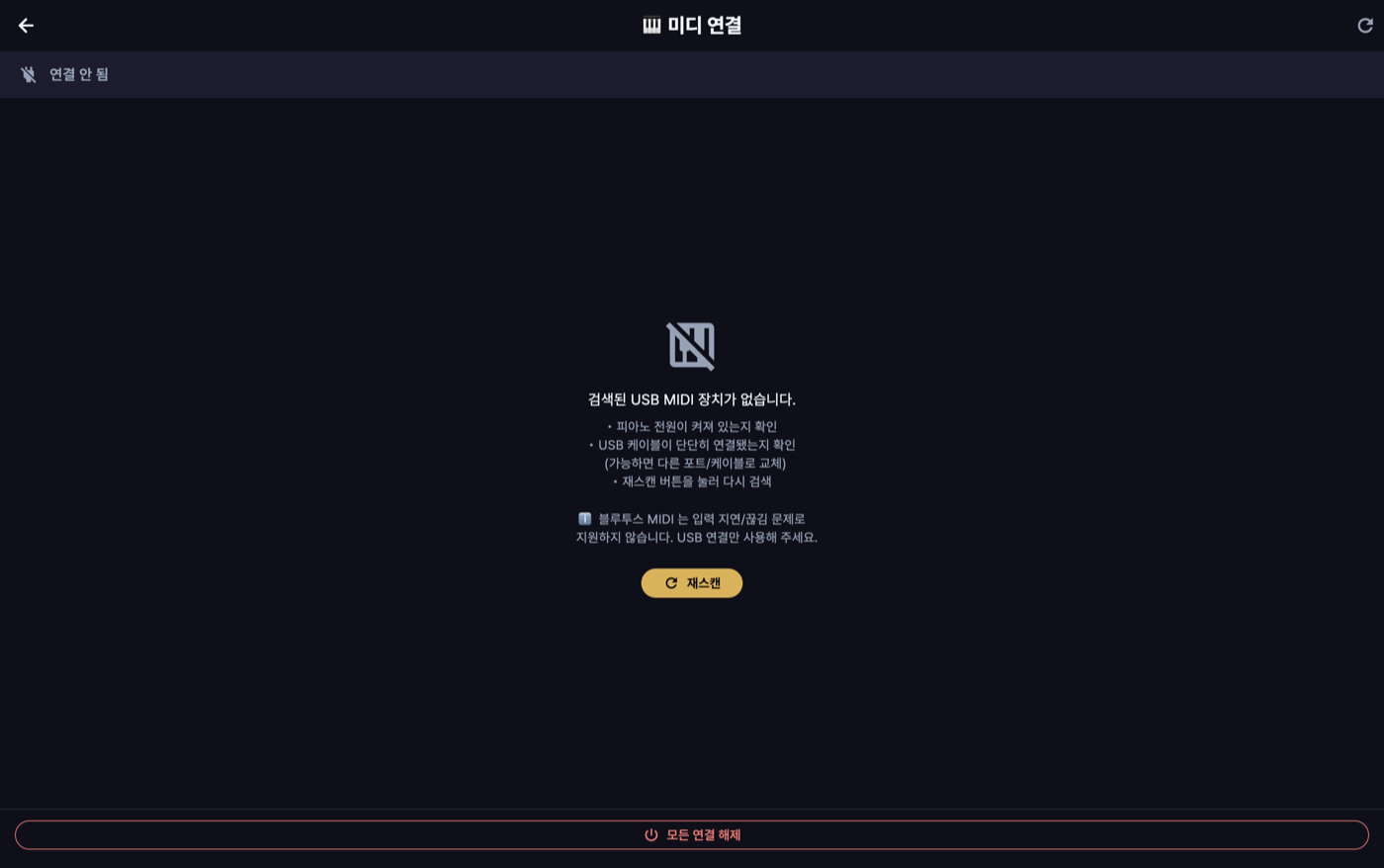
실기기 테스트에서 발견한 현실적 문제들이 있었습니다.
- 모호한 엔드포인트 — 같은 피아노가 여러 MIDI 엔드포인트로 잡히기도 합니다. 이때 아무거나 자동 연결하면 입력이 안 오는 엔드포인트를 잡아버릴 수 있어, 2개 이상이면 자동 연결하지 않고 사용자가 picker로 고르게 했습니다.
- 연주 도중 끊김 — 케이블 접촉이든 절전이든 USB-MIDI는 갑자기 멈출 수 있습니다. 연결 상태를 게임 상태와 분리해, 신호가 끊기면 채점을 밀어붙이는 대신 연결이 끊겼음을 알리고 재연결을 안내합니다. "엔진은 도는데 입력만 없는" 상태를 "사용자 실수"로 오인하지 않기 위해서입니다.
선택하지 않은 대안 — Bluetooth-MIDI. 무선이 편하지만, 블루투스 MIDI는 지연과 순간 끊김이 커서 ms 단위 판정에는 부적합했습니다. 그래서 실시간 판정 경로는 USB만 지원합니다.
결정적이라 테스트할 수 있다
이 판정 엔진의 좋은 성질은 결정적(deterministic) 이라는 점입니다. 입력은 (시각, 노트번호) 이벤트의 나열이고, 시간 계산은 전부 정수 ms입니다. 그래서 고정된 NoteChart와 미리 녹음한 입력 이벤트 로그를 넣으면 항상 같은 판정이 나옵니다.
덕분에 실기기(피아노)가 없어도 리플레이 테스트로 회귀를 잡을 수 있습니다 — "이 입력 시퀀스는 Perfect 3 + Good 1이 나와야 한다"를 단위 테스트로 고정해두면, 윈도우 값이나 버퍼 로직을 건드렸을 때 어긋남이 바로 드러납니다. 실시간·하드웨어 의존 기능일수록, 순수 함수로 짜서 테이블 테스트가 가능하게 만드는 것이 가장 큰 안전장치였습니다.
마치며
판정 엔진은 겉보기엔 단순합니다 — "제 시각에 맞는 음을 눌렀나?" 하지만 대칭 윈도우, 미리 친 음의 버퍼링, 화음의 best-fit 매칭, 어택과 지속의 분리, 하드웨어 불확실성까지 감안하면, 공정하면서도 기분 좋은 판정에는 꽤 많은 결정이 들어갑니다. 그리고 그 결정들을 전부 숫자(±50/150/300ms, 0.7·0.3, 300ms)와 순수 함수로 내려두었기 때문에, 값 하나를 바꿔도 그 효과를 테스트로 확인할 수 있었습니다.
The problem: "is this key, right now, correct?"
Like a rhythm game, LevelUp Piano flows notes down the screen and the player presses keys to hit them. But a piano isn't a few buttons — it's chords across 88 keys. And people don't play perfectly on the beat; they play a little early or late. That subtle drift has to be judged not as "right/wrong" but as a degree — Perfect, Good, Bad, or Miss.
The timeline and four verdicts
The basis for judgment is elapsed time. On an axis of milliseconds since the song started, each note has "when it should sound" and each input has "when it was pressed." The absolute value of the difference (the error) is the grade.
| Verdict | Timing error |
|---|---|
| Perfect | ≤ 50ms |
| Good | ≤ 150ms |
| Bad | ≤ 300ms |
| Miss | > 300ms (or not played) |
"Early/late" isn't a separate grade — it's shown on screen as the sign of the error. So the grade is symmetric and the direction is just informational. This window width governs the feel of difficulty: too narrow and it's frustrating, too wide and it's trivial. 300ms is a deliberately forgiving edge — "not exactly on, but you got the beat."
Two-stage judgment — attack and hold
A note's score doesn't end at the instant you press it. Let go of a note you were supposed to sustain and, even with a perfect press, it's only half right. So judgment splits in two:
- Attack — how close the NoteOn is to the expected time (the Perfect/Good/Bad/Miss above).
- Duration — how well the actual hold length matches the chart note. Short notes (≤200ms) finalize immediately on attack; long notes wait until you release (NoteOff) to be scored.
# Final score for a long note (>200ms)
final = attack_score × 0.7 + duration_score × 0.3

# Duration grade — actual hold ÷ chart length
0.8 – 1.2 → 1.0     0.5 – 1.5 → 0.7     0.3 – 2.0 → 0.3     else → 0.0
The attack grade is just as literal in code — compare the absolute error against three windows.
JudgmentResult _classifyAttack(int absOffsetMs) {
  if (absOffsetMs <= perfectWindowMs) return JudgmentResult.perfect; // ≤ 50ms
  if (absOffsetMs <= goodWindowMs)    return JudgmentResult.good;    // ≤ 150ms
  if (absOffsetMs <= badWindowMs)     return JudgmentResult.bad;     // ≤ 300ms
  return JudgmentResult.miss;
}
The whole-song score is scaled to 100 for an S (≥90) · A (≥80) · B (≥70) grade, and a measure drill counts as passed at 80% accuracy or higher.
Input buffering — holding onto notes played early
The trickiest part was ordering. What if the user presses slightly before a note becomes "active"? Just throwing that input away would wrong an honest player.
So a key press that fails to match is held in a buffer for up to 300ms. Each frame (tick) promotes notes into the active window and re-tries the buffered inputs. If 300ms passes with no note to bind to, the input is dropped (to stop a stale press from later attaching to the wrong note). In other words, judgment is bidirectional: "a note can wait for input, and input can wait for a note."
Judgment is bidirectional — a note can wait for input, and input can wait for a note. That's how even a slightly-early performance gets caught without wronging the player.
Chords and hands — which note does a press bind to?
Pianos play multiple notes at once. When several keys go down together, the question is which note each input binds to. The rule is best-fit — among unmatched active notes with the same pitch, bind to the one whose expected time is closest, and immediately lock that note as "matched."
// Among active, unmatched notes of the same pitch, bind to the closest in time.
_PendingNote? best;
var bestOffset = badWindowMs + 1;
for (final p in _active) {
  if (p.matched || p.note.noteNumber != noteNumber) continue;
  final offset = (inputTimeMs - p.note.startTimeMs).round().abs();
  if (offset < bestOffset) { bestOffset = offset; best = p; }
}
if (best == null) return null;   // nothing to bind yet → the caller buffers it
best.matched = true;             // lock: one input never binds to two notes
That "matched" lock means one input never binds to several notes within the same chord. The note chart also carries which hand each note belongs to (left/right), the foundation for practicing one hand or diagnosing weaknesses per hand.
Surviving a dropped connection
Real-world problems found in device testing:
- Ambiguous endpoints — the same piano can show up as several MIDI endpoints. Auto-connecting to any of them risks grabbing one that receives no input, so with two or more, it doesn't auto-connect — the user picks via a picker.
- Dropping mid-performance — a loose cable, power saving; USB-MIDI can stop suddenly. Connection state is kept separate from game state, so when the signal drops the app signals the drop and guides reconnection instead of plowing ahead with scoring — so "the engine is running but there's no input" isn't mistaken for "user error."
The alternative not chosen — Bluetooth-MIDI. Wireless is convenient, but Bluetooth MIDI has too much latency and too many micro-dropouts for millisecond-level judgment. So the real-time path is USB only.
Deterministic, therefore testable
A nice property of this engine is that it's deterministic. Input is just a list of (time, note number) events, and all timing math is integer milliseconds. So feed it a fixed NoteChart and a pre-recorded input event log, and it always produces the same judgments.
That means regressions can be caught with replay tests — no piano required. Pin down "this input sequence should yield Perfect ×3 + Good ×1" as a unit test, and any change to a window value or the buffer logic makes the divergence show up immediately. The more real-time and hardware-dependent a feature is, the more writing it as a pure function — so it can be table-tested — becomes the biggest safety net.
Closing
The judgment engine looks simple on the surface — "did you press the right note at the right time?" But once you account for symmetric windows, buffering early presses, best-fit chord matching, splitting attack from hold, and hardware uncertainty, a judgment that's both fair and satisfying takes a lot of decisions. And because every one of them lives as a number (±50/150/300ms, 0.7·0.3, 300ms) and a pure function, changing a single value means its effect can be confirmed by a test.