한국어로 시작했지만
LevelUp Piano는 처음에 한국어 전용이었습니다. 빠르게 만들 땐 그게 맞았습니다. 하지만 피아노 학습에는 국경이 없고, 앱스토어는 전 세계가 무대입니다. 그래서 영어를 시작으로, 이후 중국어·일본어까지 확장하기로 했습니다.
문제는 "번역"이 생각보다 여러 겹이라는 것이었습니다.
세 겹의 로컬라이제이션
1겹. UI 문자열
버튼·안내문 같은 화면 텍스트는 Flutter의 지역화 도구(ARB 기반 gen_l10n)로 옮겼습니다. 코드에 박힌 문자열을 키로 바꾸고, 언어별 리소스 파일에서 값을 채웁니다. 여기까진 정석입니다.
2겹. 콘텐츠 데이터
까다로운 건 곡 제목 같은 콘텐츠였습니다. 이건 코드가 아니라 데이터베이스에 있는 값이라, UI 지역화로는 안 됩니다. 그래서 곡 데이터에 로케일별 번역 필드를 붙였습니다. 기존의 단일 값(예: 한국어 제목)은 그대로 폴백으로 남기고, 그 위에 {"ko": "...", "en": "..."} 형태의 번역을 얹는 방식입니다. 값이 없으면 폴백으로, 있으면 사용자 언어로 보여줍니다.
마이그레이션은 기존 컬럼을 건드리지 않고 번역 컬럼을 덧붙이는(additive) 방향이라, 구버전 클라이언트와도 호환됩니다.
// 기존 title(폴백)은 유지, 로케일 번역은 nullable JSON으로 덧붙임
val title             = varchar("title", 200)                  // 폴백(원어)
val titleTranslations = text("title_translations").nullable()  // {"ko":"…","en":"…"}
// 해석 규칙: translations[locale] ?? title
3겹. 네이티브 권한 문구
가장 놓치기 쉬운 곳이었습니다. iOS의 마이크·사진 권한 팝업 문구는 Flutter가 아니라 네이티브 설정에 있어서, 영어 기기에서도 한글 팝업이 뜨고 있었습니다. 이건 앱스토어 심사자도 보는 화면이라, 언어별 리소스 파일을 따로 만들어 분리했습니다.
미지원 언어는 영어로
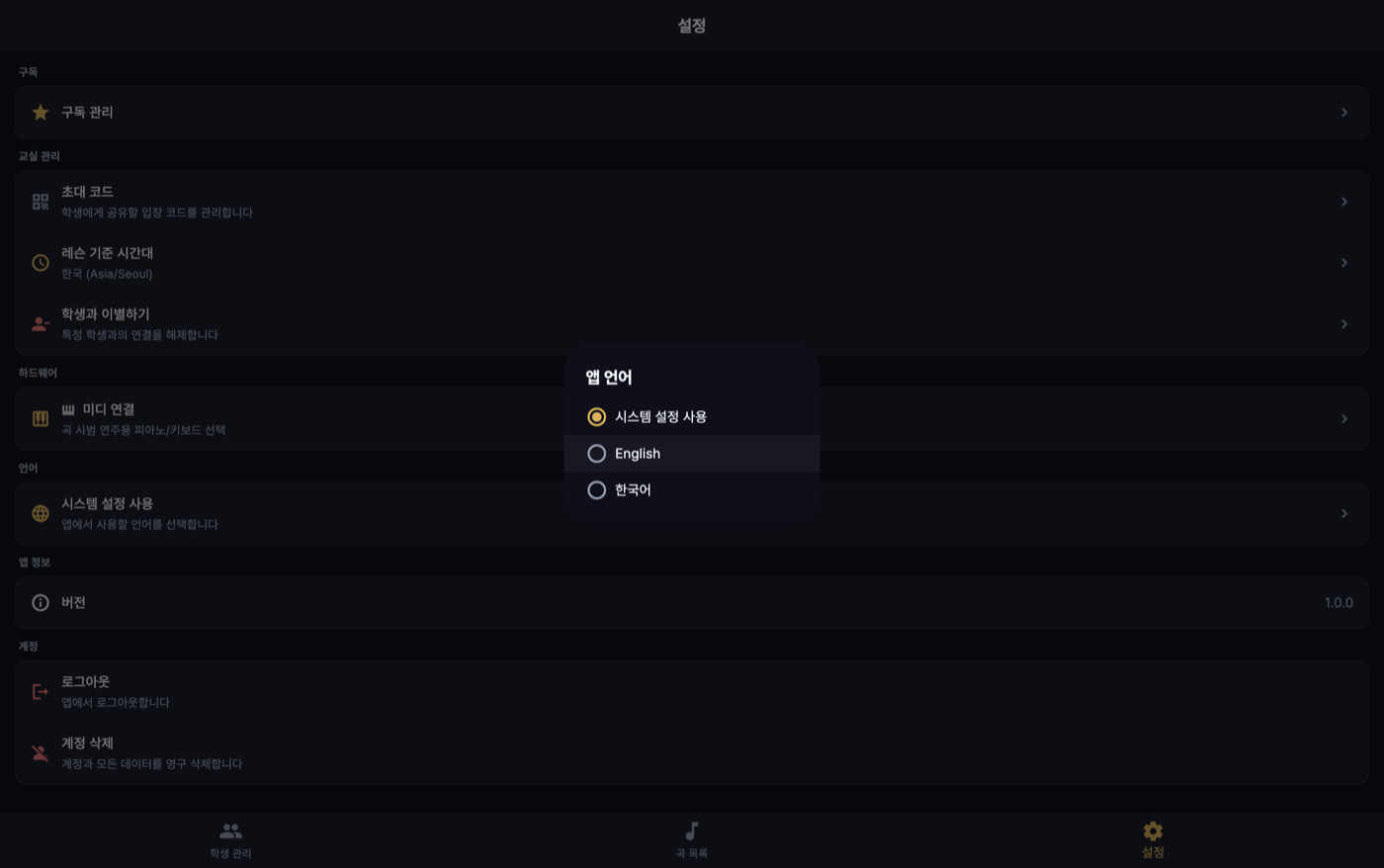
세상의 모든 언어를 지원할 수는 없습니다. 그래서 규칙을 정했습니다: 기기 언어가 지원 목록에 없으면 영어로 폴백한다. 현재 지원은 한국어·영어이고 계획은 중국어·일본어입니다. 한국어 사용자에겐 한국어를, 그 외에는 (아직) 영어를. 사용자가 앱 안에서 언어를 직접 고를 수도 있고, 이 선택은 저장됩니다.
"진짜로 전부 번역됐나" — 감사
다국어의 함정은, 눈에 잘 안 띄는 한 줄이 남는 것입니다. 그래서 rg로 코드 전체의 문자열 리터럴에 남은 한글을 훑는 스캔을 돌렸습니다 — 원어가 한국어이므로 이게 가장 정확한 신호입니다. 아직 CI 게이트로 강제하진 않고 릴리스 전 점검 스크립트로 씁니다.
대부분은 개발자 로그나 주석이라 사용자 비노출이었지만, 진짜 갭도 나왔습니다 — 대표적으로 난이도 라벨(Easy/Normal/Hard/Expert)이 데이터 원값 그대로 화면에 떠서 한국어 사용자에게 영어로 보이고 있었습니다. 값은 데이터 계약대로 두되, 표시 시점에 언어별 라벨로 매핑하도록 고쳤습니다.
다국어는 파일을 번역가에게 넘기는 일이 아니라 표시되는 모든 표면을 찾는 일이다. 층이 다르면 옮기는 방법도 다르고, 놓친 한 층은 심사자 눈에 먼저 띈다.
배운 것
다국어는 "번역가에게 파일을 넘긴다"가 아니라 표시되는 모든 표면을 찾는 일이었습니다. UI 문자열, 데이터 안의 텍스트, 네이티브 팝업 — 층이 다르면 옮기는 방법도 다릅니다. 그리고 폴백 규칙을 명확히 정해두면, 아직 번역이 없는 언어의 사용자도 깨진 화면이 아니라 영어로 온전한 경험을 합니다. 처음부터 다국어를 염두에 두고 데이터 모델을 잡아둔 것이, 확장 시점에 가장 큰 도움이 됐습니다.
It started in Korean, but
LevelUp Piano began Korean-only. For moving fast, that was right. But piano learning has no borders, and the App Store's stage is the whole world. So we decided to expand — English first, then Chinese and Japanese.
The catch was that "translation" has more layers than it seems.
Three layers of localization
Layer 1. UI strings
Screen text like buttons and notices moved to Flutter's localization tooling (ARB-based gen_l10n). Strings hardcoded in code become keys, and per-language resource files fill in the values. So far, textbook.
Layer 2. Content data
The tricky part was content like song titles. These aren't code — they're values in the database, so UI localization doesn't reach them. So song data got per-locale translation fields. The existing single value (say, the Korean title) stays as a fallback, and translations of the form {"ko": "...", "en": "..."} layer on top. No value → fall back; value present → show it in the user's language.
The migration is additive — it leaves the existing column alone and appends a translation column, so it stays compatible with older clients.
// Keep the existing title (fallback); append locale translations as nullable JSON
val title             = varchar("title", 200)                  // fallback (source)
val titleTranslations = text("title_translations").nullable()  // {"ko":"…","en":"…"}
// Resolution rule: translations[locale] ?? title
Layer 3. Native permission strings
The easiest place to miss. iOS's microphone and photo permission dialogs live in native settings, not Flutter — so English-locale devices were still showing Korean pop-ups. Since App Store reviewers see that screen too, we split them into separate per-language resource files.
Unsupported languages fall back to English
You can't support every language on earth. So we set a rule: if the device language isn't in the supported list, fall back to English. Supported today is Korean and English, with Chinese and Japanese planned. Korean for Korean users, English (for now) for everyone else. Users can also pick a language inside the app, and that choice is saved.
"Is everything really translated?" — the audit
The trap of going multilingual is one stray line that hides in plain sight. So we ran an rg scan across the whole codebase for Korean left inside string literals — since the source language is Korean, that's the most accurate signal. It isn't a CI gate yet; it runs as a pre-release check script.
Most hits were developer logs or comments — not user-facing — but real gaps surfaced too. Notably, difficulty labels (Easy/Normal/Hard/Expert) were rendering as raw data values, showing English to Korean users. We kept the values per the data contract but mapped them to per-language labels at display time.
Going multilingual isn't handing files to a translator — it's finding every surface that gets shown. Different layers move in different ways, and the one you miss is the one a reviewer spots first.
What I learned
Going multilingual isn't "hand files to a translator" — it's finding every surface that gets shown. UI strings, text inside data, native pop-ups — different layers move in different ways. And with a clear fallback rule, users of a not-yet-translated language get a whole English experience rather than a broken screen. Designing the data model with multiple languages in mind from the start helped most when it came time to expand.